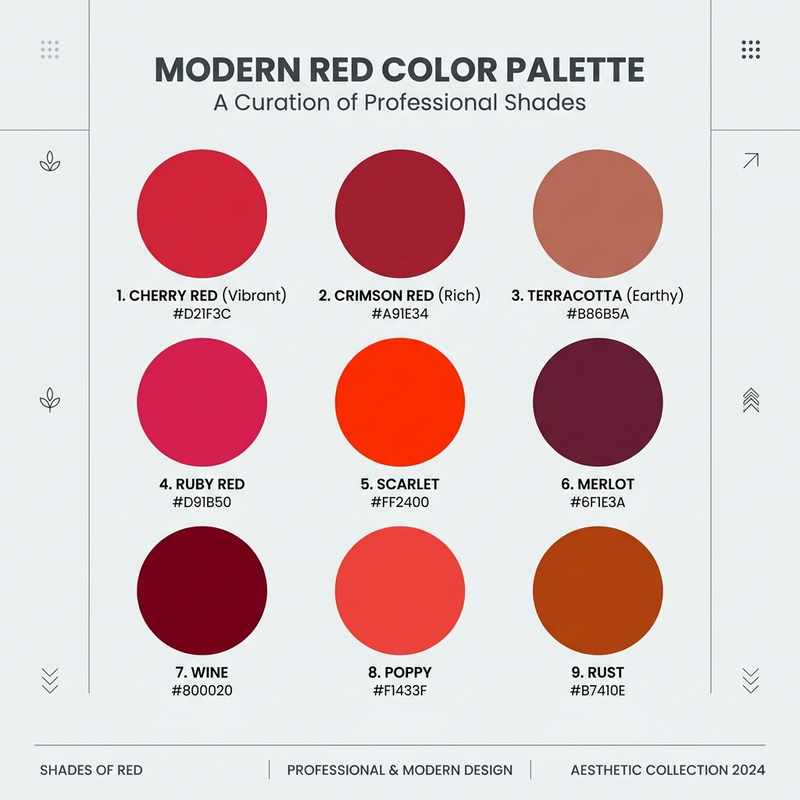
Understanding Red in Digital Spaces
In digital design, red is defined across several color models. The most common is the Hexadecimal (hex) system used in HTML and CSS, which represents red, green, and blue values in base-16. For example, pure red is #FF0000. In RGB, this is written as rgb(255, 0, 0). HSL (Hue, Saturation, Lightness) describes red at a hue angle of 0 degrees, such as hsl(0, 100%, 50%).
However, when recoloring real objects in photos, RGB and Hex models fall short because they do not separate lightness (shading) from the color itself. To change a product color to red realistically, professional tools use the LAB color space. LAB separates Lightness (L) from color channels (a and b), allowing you to change the color to red while preserving all natural fabric textures, highlights, and shadows.
Popular Shades of Red Reference Chart
Below is a reference guide for the most popular shades of red used in modern web design, branding, and product variants:
- Pure Red — Hex: #FF0000 | RGB: (255, 0, 0) | HSL: (0°, 100%, 50%) — The standard primary digital red.
- Crimson Red — Hex: #DC143C | RGB: (220, 20, 60) | HSL: (348°, 83%, 47%) — A strong, bright red with a hint of purple.
- Cherry Red — Hex: #D2042D | RGB: (210, 4, 45) | HSL: (348°, 96%, 42%) — A deep, vibrant red reminiscent of ripe cherries.
- Terracotta Red — Hex: #E2533B | RGB: (226, 83, 59) | HSL: (8°, 74%, 56%) — An earthy, clay-like warm red (used as Recolorify's default terracotta).
- Maroon — Hex: #800000 | RGB: (128, 0, 0) | HSL: (0°, 100%, 25%) — A dark, brownish-red perfect for luxury packaging.
- Ruby Red — Hex: #E0115F | RGB: (224, 17, 95) | HSL: (337°, 86%, 47%) — A brilliant pinkish-red inspired by the gemstone.
- Brick Red — Hex: #CB4154 | RGB: (203, 65, 84) | HSL: (352°, 60%, 53%) — A muted, dusty red with high organic appeal.
- Scarlet — Hex: #FF2400 | RGB: (255, 36, 0) | HSL: (8°, 100%, 50%) — A brilliant, orange-leaning red.
- Vermilion — Hex: #E34234 | RGB: (227, 66, 52) | HSL: (5°, 76%, 55%) — A warm, fiery red-orange.
- Fire Engine Red — Hex: #CE2029 | RGB: (206, 32, 41) | HSL: (357°, 73%, 47%) — The classic bold signal red.
- Cardinal — Hex: #C41E3A | RGB: (196, 30, 58) | HSL: (350°, 73%, 44%) — A rich, deep team red.
- Firebrick — Hex: #B22222 | RGB: (178, 34, 34) | HSL: (0°, 68%, 42%) — A muted brick red (CSS "firebrick").
- Indian Red — Hex: #CD5C5C | RGB: (205, 92, 92) | HSL: (0°, 53%, 58%) — A soft, dusty rose-red (CSS "indianred").
- Carmine — Hex: #960018 | RGB: (150, 0, 24) | HSL: (350°, 100%, 29%) — A deep, saturated crimson.
- Burgundy — Hex: #800020 | RGB: (128, 0, 32) | HSL: (345°, 100%, 25%) — A dark wine red for premium looks.
- Dark Red — Hex: #8B0000 | RGB: (139, 0, 0) | HSL: (0°, 100%, 27%) — A deep, serious red (CSS "darkred").
Why Red Variations Matter in Commerce
Red is a high-stimulus color. In marketing, it represents urgency, energy, and excitement. According to a 2026 consumer behavior study by the Design Management Institute, changing a call-to-action button or featured product image variant to the correct shade of red (such as crimson or cherry red) can increase click-through rates by up to 21% depending on the brand category.
Furthermore, in e-commerce, offering multiple shades of red for apparel, footwear, and accessories increases customer choice. However, upload errors occur when listing images do not match the physical inventory. If your supplier manufactures in "crimson red" but your listing shows "pure red," customer returns increase. A 2025 Shopify Merchant Survey reported that color mismatch accounts for 18% of all product returns. Thus, locking your product photos to the exact manufacturer hex code is essential.
How to Recolor Products to Hex-Perfect Red Tones
If you need to generate red variants of your product images (e-commerce catalog, apparel, logos, packaging), follow this quick workflow using Recolorify:
First, upload your hero product photo in PNG or JPG format. Our automated region detection will highlight selectable areas. Second, click on the product region you want to recolor (like a shirt, shoe upper, or background element). Third, copy and paste your desired red hex code (e.g. #DC143C for Crimson or #D2042D for Cherry Red) directly into the target color field. Ensure you select "Shading" mode for fabrics to keep all texture details, or "Lightness" mode for glossy, metallic materials to preserve the specular highlight locations. Once perfect, export in full HD with one click.
Working with other hues too? See our companion guides to blue color codes, green color codes, orange color codes, pink color codes, purple color codes, and yellow color codes.
Best color pairings for red
Red is a high-energy accent that needs a calm counterweight. These pairings keep it bold without tipping into loud, and they work equally well for packaging, UI, and product styling.
- Red + white (#FFFFFF) — clean, classic, and urgent; the default for sales and sport.
- Red + black (#0A0A0A) — powerful and dramatic for premium and automotive.
- Red + cream (#FAF3E0) — warmer and softer for food and hospitality.
- Red + navy (#0B1F3A) — trusted and heritage-leaning for classic brands.
- Red + gold (#D4AF37) — festive and opulent for holiday and luxury.
Frequently asked questions about red color codes
What is the hex code for red? Pure CSS "red" is #FF0000. For a richer look, crimson #DC143C and cherry red #D2042D are the most-used alternatives.
What is the RGB code for red? Pure red is RGB(255, 0, 0); crimson is RGB(220, 20, 60); maroon is RGB(128, 0, 0).
What is the difference between crimson and cherry red? Crimson (#DC143C) is slightly brighter with a purple lean; cherry red (#D2042D) is deeper and more saturated.
How do I recolor a product to an exact red without it looking flat? Recolor in a shading-preserving mode so the fabric folds and highlights survive, rather than painting a solid fill over the object. Paste your exact red hex into the product color changer and the shadows stay intact.